

How 360° Product Photography Helps Shoppers See More Before They Buy
A single well-lit product shot tells you a lot—the shape, color, and general character of an item. What it can’t show you is the back panel, the depth, how a handle feels, or the finish on hidden seams.
For many products, those unanswered details are the only barrier between a browser and a buyer. A 360° view gives shoppers direct control: they can turn the product themselves and inspect every angle on their own terms.
What is 360° Product Photography?
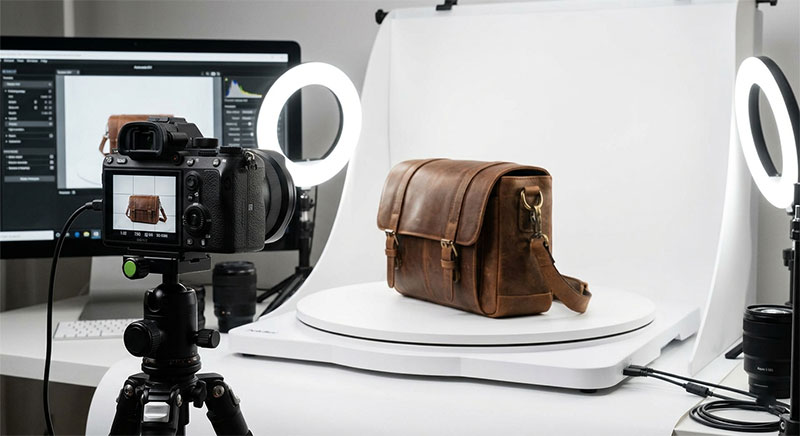
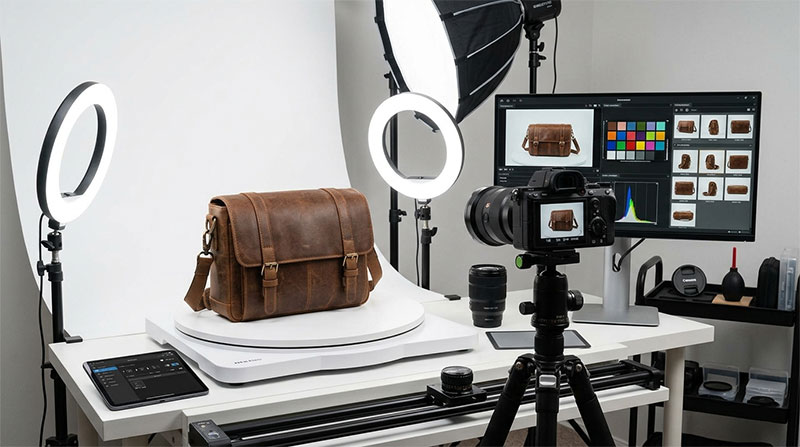
A 360° view is a sequence of still images captured at evenly spaced angles around an object—typically as the product rotates on a turntable while the camera remains fixed. These frames load into an interactive viewer that plays them back as the user drags their cursor or finger, creating the impression of continuous rotation.
There is no video involved and no 3D rendering required for standard shoots—just a clean set of stills paired with lightweight front-end code.
For brands managing large catalogues, product photography 360 can be created via physical turntable shoots or rendered 3D spins depending on sample availability, timelines, and required visual control. Both methods yield the same result on the product page: a viewer the customer can spin.
When a 360° View is Worth Creating?
Not every item needs a rotational view; a flat printed poster gains nothing from a spin. The products that benefit most are those with critical information on the sides, back, or base.
- Furniture: Reveals depth, reverse finishes, and leg construction.
- Footwear & Bags: Highlights structural profiles and rear panels.
- Watches & Jewelry: Displays clasp mechanisms, case depth, and side detailing.
- Electronics: Clarifies port placement, button layouts, and connectivity options.
- Tools, Appliances & Hardware: Showcases handles, silhouettes, and moving mechanisms.
The Golden Rule: If a customer would naturally pick up and turn the item over in a physical store, it is a primary candidate for a 360° view.
Technical Best Practices for Studio Shoots
1. Keep the Camera Fixed and Centered
Consistency determines whether a spin feels high-end or sloppy.
- Lock the camera on a heavy tripod and do not adjust it mid-shoot.
- Precision-center the product on the turntable’s rotation axis. Off-center items swing across the frame rather than rotating in place.
- Secure the product with hidden mounting putty to prevent micro-wobbles during movement.
- Frame the shot with extra margin to prevent clipping asymmetrical edges as the item turns.
2. Lock Down Lighting and Camera Settings
In static photography, dramatic lighting works well. In 360° photography, dynamic light creates distracting frame-to-frame flicker.
- Manual Exposure: Auto-exposure will adjust to changing surface reflectivity, causing a pulsating effect.
- Fixed White Balance: Prevents color shifts across the sequence.
- Manual Focus: Autofocus will hunt between frames, causing the subject to pop in and out of sharpness.
- Soft, Continuous Light: Diffused lighting from multiple angles prevents harsh shadows from swinging wildly across the background.
Tip for Reflective Products: Glossy and metallic items display dynamic reflections. Always perform a full test spin to spot distracting light glare before shooting the final sequence.
Balancing Frame Count and Load Speed
Frame count represents a direct trade-off between visual smoothness and website performance:
| Frame Count | Visual Quality | Page Weight / Load Time | Best Used For |
| 12 – 18 Frames | Stepped rotation; less fluid | Extremely light; fast mobile loading | Simple, symmetrical objects |
| 24 – 36 Frames | Smooth, continuous glide | Moderate; requires image optimization | Detailed, complex products |
| 72+ Frames | Hyper-realistic, seamless spin | Heavy; risk of slow mobile load times | High-end luxury items (desktop focus) |
Since most shoppers browse on mobile devices, always optimize image file sizes and test mobile load speeds before deploying high-frame-count spins.
Complementing the Standard Gallery
A 360° spin is a powerful component of a product detail page (PDP), but it does not replace traditional photography. The spin answers “What does this look like from all sides?” while the rest of the gallery completes the narrative:
- Hero Shot: Clean, high-impact image for search thumbnails.
- Lifestyle Images: Provides real-world context and scale.
- Macro Detail Shots: Close-ups of fabric texture, stitching, or material grain.
- Dimensional Graphics: Clear measurements for sizing and fit.
- In-the-Box Shots: Shows accessories and included components.
When CGI-Generated 360° Spins Make Sense
Rendered 360° spins offer a viable alternative to physical photography under specific operational conditions:
- Pre-Production Marketing: Assets are required before physical manufacturing samples exist.
- Variant Density: A single product offers dozens of colorways or material finishes, making physical shoots cost-prohibitive.
- Logistical Constraints: Items are too large, fragile, or expensive to transport to a photography studio.
- Ecosystem Reuse: The underlying 3D model will also be used for AR previews, 3D configurators, or lifestyle renders.
While CGI offers complete environmental control, traditional photography remains the gold standard for tactile authenticity and natural texture.
Pre-Publishing Checklist
- Is the product precisely centered on the rotation axis without wobble?
- Are exposure, focus, and white balance locked to manual?
- Is the lighting uniform across every frame in the sequence?
- Is the rotation playback smooth and free of missing-frame jumps?
- Are all image files compressed for fast mobile page load speeds?
- Does the viewer support responsive touch-dragging on mobile screens?
- Are macro detail shots and dimensional graphics included alongside the spin?
Summary
A 360° view earns its place on a product page when it answers real buying questions that static images leave open. By prioritizing frame-to-frame consistency and optimizing load speeds, brands can transform a simple product gallery into an interactive, high-converting inspection tool.
